|
前言 在进行策略回测时,经常需要使用历史 K 线数据。尤其是在股票池较多、回测时间比较长的情况下,传统的数据读取方式往往效率低下,尤其对于配置较低的硬件来说,用户体验更是不佳。 为了提高 K 线数据的读取速度并改善用户体验,我们可以结合迅投的行情接口,采用更高效的数据结构——Feather。 如何使用?三大操作步骤如下: - 1.生成 Feather 数据文件——极速准备行情数据
- 2.修改策略,将数据读取代码替换为 Feather 格式
- 3.进行回测
详细指引:1.生成 Feather 数据:操作轻松,速度提升近 800 倍以下是已准备好的数据,您只需根据实际情况修改参数即可: - import os
- # 参数设置
- data_dir_path = r'E:\tokendatadir'
- start_time ='19990101'
- end_time ='20240227'
- period ='1d'
- dividend_type ='front_ratio' # 等比前复权
- token ='' # 填自己的实际token,可以加群或者https://dict.thinktrader.net/dictionary/?id=I3DJ97#%E5%A6%82%E4%BD%95%E6%88%90%E4%B8%BA-vip-%E8%A1%8C%E6%83%85%E7%94%A8%E6%88%B7 了解详细信息
- output_dir = os.path.join(data_dir_path, r'feather')
- if not os.path.exists(output_dir):
- os.makedirs(output_dir)
- if 1:
- # 导入 xtdatacenter 模块
- from xtquant import xtdatacenter as xtdc
- xtdc.set_token(token)
- xtdc.set_data_home_dir(data_dir_path)
- print(help(xtdc.set_data_home_dir))
- xtdc.init()
-
- from xtquant import xtdata
- #下载
- xtdata.download_sector_data()
- stock_lists = xtdata.get_stock_list_in_sector('沪深A股')
- def on_download(info):
- print(info)
- if 1:
- xtdata.download_history_data2(stock_lists, start_time=start_time, end_time=end_time, period=period,callback=on_download, incrementally=False)
- ex_price = xtdata.get_market_data([],stock_lists,period=period,start_time=start_time,end_time=end_time,fill_data=False,dividend_type=dividend_type)
- for col in ex_price:
-
- output = os.path.join(output_dir, col+period+'.feather')
- ex_price[col].T.to_feather(output)
- print('完成')
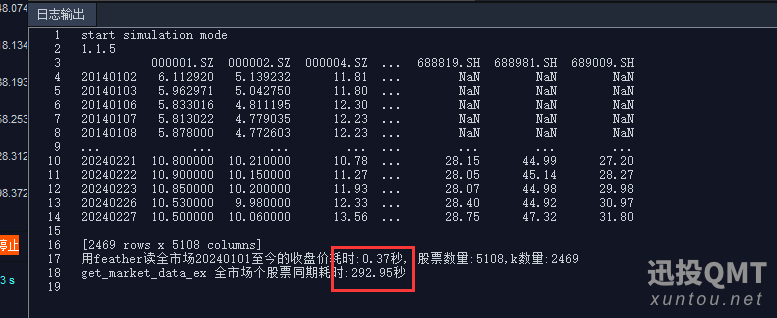
注意:实际应用中,该脚本只需每天运行一次以更新数据。若仅需回测特定时间段的行情,则无需更新数据。 2.Feather 与 QMT 速度对比:秒速读取,轻松体验从下图可以看出,Feather 的数据读取速度快了近 800 倍!而且几乎是秒速读取,完全没有卡顿感。 3.修改策略,使用 Feather 进行数据读取:极速回测,一键体验最后,在您的策略中,将数据读取代码修改为使用 Feather 格式,快来体验极速回测吧!
| 

 发表于 2025-5-15 11:16:25